In-cluster deployment
The interLink API server runs inside your Kubernetes cluster, next to the virtual kubelet. Nothing has to be installed on an edge node, and no interLink component is exposed to the internet.
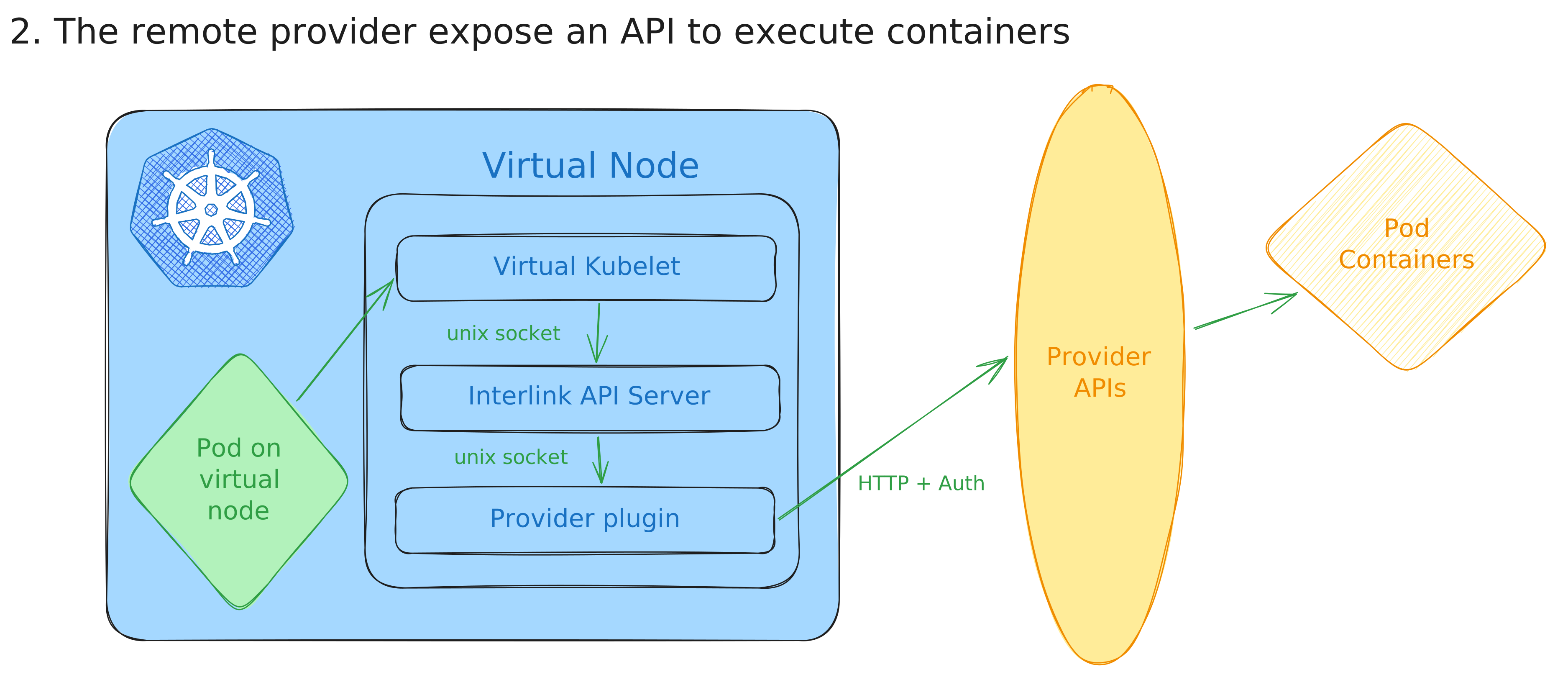
The remaining choice is where the plugin runs, and how the API server reaches it:
| Plugin runs | API to plugin link | Use when | |
|---|---|---|---|
| In the cluster | as a container in the same pod | localhost | the plugin can reach the remote system on its own — a shared filesystem, an SSH shim, a REST API |
| On the remote system | on the login node or an edge host | SSH tunnel over a Unix socket | the plugin has to run where the batch system is, and you cannot expose a port for it |
If instead you want the API server and the plugin to run on the remote side, see the edge node deployment.
Plugin in the cluster
Everything runs in one pod: virtual kubelet, interLink API server and plugin.
Deploy Kubernetes components
The deployment of the Kubernetes components is managed by the official HELM chart.
- Create an helm values file:
nodeName: interlink-in-cluster

interlink:
  enabled: true
  address: http://localhost
  port: 3000
  logging:
    verboseLogging: true

plugin:
  enabled: true
  image: "ghcr.io/interlink-hq/interlink-sidecar-slurm/interlink-sidecar-slurm:0.5.1"
  address: "http://localhost"
  port: 4000
  privileged: true
  extraVolumeMounts:
    - name: plugin-data
      mountPath: /slurm-data
  envs:
    - name: SLURMCONFIGPATH
      value: "/etc/interlink/plugin.yaml"
    - name: SHARED_FS
      value: "true"
  config: |
    #Socket: "unix:///var/run/plugin.sock"
    ImagePrefix: "docker://"
    SidecarPort: 4000
    VerboseLogging: true
    ErrorsOnlyLogging: false
    DataRootFolder: "/slurm-data/"
    ExportPodData: true
    SbatchPath: "/usr/bin/sbatch"
    ScancelPath: "/usr/bin/scancel"
    SqueuePath: "/usr/bin/squeue"
    CommandPrefix: ""
    SingularityPrefix: ""
    Namespace: "vk"
    Tsocks: false
    TsocksPath: "$WORK/tsocks-1.8beta5+ds1/libtsocks.so"
    TsocksLoginNode: "login01"
    BashPath: /bin/bash

virtualNode:
  resources:
    CPUs: 4
    memGiB: 16
    pods: 50

extraVolumes:
  - name: plugin-data
    hostPath:
      path: /tmp/test
      type: DirectoryOrCreate
On some Kubernetes distributions (e.g. minikube) /tmp on the node is mounted
with the noexec option, so scripts placed in the plugin data folder cannot be
executed. If that is your case, pick a different host path for the
plugin-data volume, e.g. /data/interlink.
Eventually deploy the latest release of the official:
  export INTERLINK_CHART_VERSION="X.X.X"
  helm upgrade --install \
  --create-namespace \
  -n interlink \
  my-node \
  oci://ghcr.io/interlink-hq/interlink-helm-chart/interlink \
  --version $INTERLINK_CHART_VERSION \
  --values values.yaml
Remember to pick the
version of the chart
and put it into the INTERLINK_CHART_VERSION env var above.
Whenever you see the node ready, you are good to go!
You can find a demo pod to test your setup here.
To start debugging in case of problems we suggest starting from the pod containers logs!
Reaching the batch system from inside the cluster
The plugin still has to submit jobs somewhere. Which mechanism it uses is a plugin concern rather than an interLink one, but the common ones are:
- Shared filesystem plus SSH shims. Mount the remote scratch area into the
plugin container, and point the plugin's
SbatchPath/SqueuePath/ScancelPathat small wrappers thatexec ssh user@login /usr/bin/<cmd>. The plugin never has to know it is not running on the login node. - A plugin that speaks a remote API — Kubernetes, a cloud batch service, a site REST endpoint.
If neither fits, run the plugin on the remote system instead.
Plugin on the remote system
Some sites will not let you expose a port for the plugin, but do allow outbound SSH. In that case the plugin runs on the login node and the API server reaches it through an SSH tunnel terminating on a local Unix socket.
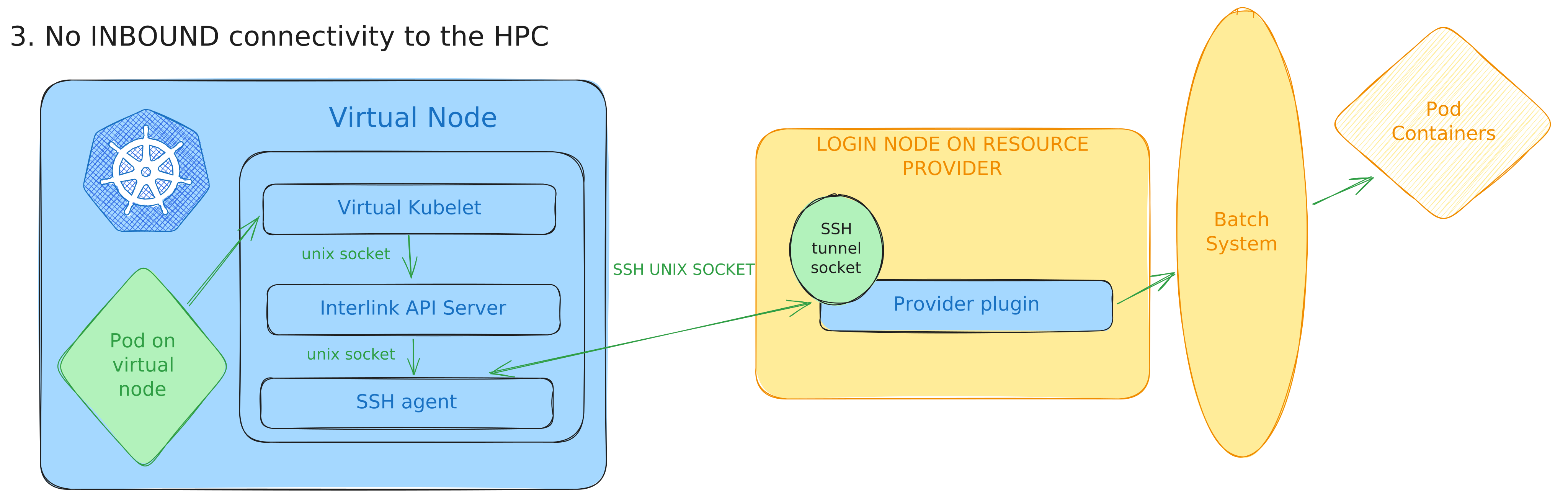
[Virtual Kubelet] -> [interLink API] -> [Unix socket] -> [SSH tunnel] -> [Plugin]
     (local)             (local)          (local)        (ssh bridge)   (remote)
This tunnel carries interLink's control plane — the API server talking to its plugin. It is unrelated to the SSH shadow, which carries traffic into an already-running offloaded pod. A deployment can use either, both, or neither.
Prerequisites
- SSH access to the remote system where the plugin runs
- SSH key pair for authentication
- Network connectivity from the local system to the remote SSH server
- interLink binary built with the ssh-tunnel command (
make ssh-tunnel)
SSH key setup
# Generate SSH key pair
ssh-keygen -t rsa -b 4096 -f ~/.ssh/interlink_rsa

# Copy public key to remote server
ssh-copy-id -i ~/.ssh/interlink_rsa.pub user@remote-server

# Test SSH connection
ssh -i ~/.ssh/interlink_rsa user@remote-server
Optional: host key verification
# Extract host public key from remote server
ssh-keyscan -t rsa remote-server > ~/.ssh/interlink_host_key

# Or get it from known_hosts
ssh-keygen -F remote-server -f ~/.ssh/known_hosts | grep -o 'ssh-rsa.*' > ~/.ssh/interlink_host_key
Step 1: point the API server at a Unix socket
# Use Unix socket for local communication
InterlinkAddress: "unix:///tmp/interlink.sock"
InterlinkPort: ""  # Not used for Unix sockets

# Remote plugin configuration
SidecarURL: "http://remote-plugin"
SidecarPort: "4000"

VerboseLogging: true
ErrorsOnlyLogging: false
DataRootFolder: "/tmp/interlink"
Step 2: point the virtual kubelet at the same socket
InterlinkURL: "unix:///tmp/interlink.sock"
InterlinkPort: ""  # Not used for Unix sockets

VerboseLogging: true
ErrorsOnlyLogging: false

NodeName: "my-interlink-node"
NodeLabels:
  "interlink.cern.ch/provider": "remote-hpc"
Step 3: start the tunnel
./bin/ssh-tunnel \
  -addr "remote-server:22" \
  -user "username" \
  -keyfile "~/.ssh/interlink_rsa" \
  -lsock "/tmp/interlink.sock" \
  -rport "4000" \
  -hostkeyfile "~/.ssh/interlink_host_key"   # optional, but recommended
| Option | Description | Required |
|---|---|---|
-addr | SSH server address as hostname:port | Yes |
-user | Username for SSH authentication | Yes |
-keyfile | Path to private key file | Yes |
-lsock | Path to local Unix socket | Yes |
-rport | Remote port where the plugin listens | Yes |
-hostkeyfile | Path to host public key for verification | No |
Start the components in dependency order: tunnel, then API server, then virtual kubelet.
To run these as managed services, see the systemd deployment guide, which includes the SSH tunnel unit and the ordering constraints between the three.
Hardening the tunnel account
Restrict what the tunnel key is allowed to do on the remote side:
command="/usr/bin/false",no-pty,no-X11-forwarding,no-agent-forwarding ssh-rsa AAAAB3... interlink-tunnel-key
Match User interlink
    AllowTcpForwarding yes
    AllowStreamLocalForwarding yes
    PermitTunnel no
    X11Forwarding no
    AllowAgentForwarding no
    PermitTTY no
    ForceCommand /bin/false
Troubleshooting
# Is the tunnel process alive?
ps aux | grep ssh-tunnel

# Does the socket answer?
curl -s --unix-socket /tmp/interlink.sock http://unix/pinglink

# Is the plugin listening on the remote side?
ssh user@remote-server 'netstat -tlnp | grep :4000'
Verify the setup
# Check if node appears in Kubernetes
kubectl get nodes

# Deploy a test pod
kubectl apply -f - <<EOF
apiVersion: v1
kind: Pod
metadata:
  name: test-incluster
spec:
  nodeSelector:
    kubernetes.io/hostname: interlink-in-cluster
  tolerations:
    - key: virtual-node.interlink/no-schedule
      operator: Exists
  containers:
  - name: test
    image: busybox
    command: ["sleep", "3600"]
EOF

kubectl get pod test-incluster -o wide
kubectl logs test-incluster
When the virtual node registers, the virtual kubelet requests a
kubelet-serving certificate. Kubernetes does not auto-approve this kind of
CSR by default, so on clusters without an external approver the request stays
Pending and commands like kubectl logs against pods on the virtual node
fail with tls: internal error. Check for pending requests and approve them
manually:
kubectl get csr
kubectl certificate approve <csr-name>
Reaching services inside offloaded pods
Everything above gets jobs onto the remote system. Reaching a service that runs inside an offloaded pod — a notebook, a dashboard — is a separate concern, handled by a shadow pod that interLink creates for any offloaded pod with exposed ports.
| Direction | Requires | Guide | |
|---|---|---|---|
| wstunnel | cluster to pod | outbound internet from the compute node, and a public ingress on the cluster | Wstunnel |
| SSH | cluster to pod | outbound SSH from the cluster to a login node | SSH tunnel |
| Full mesh | bidirectional | same as wstunnel, plus an unprivileged network namespace on the compute node | Mesh network |
Air-gapped sites — compute nodes with no route out, clusters with no public ingress — generally want the SSH one.
For additional case studies and advanced configurations, reach out to the interLink community through the Slack channel.